Information Technology
Didloo Messaging App: Android Chats, Calls and Desktop Linking
Didloo is an independent messaging platform for conversations between people using Didloo. Its public product pages describe Android messaging, personal and group chats, media sharing, voice and video calls, and linked computer access through Didloo Web. This guide explains how to evaluate those everyday workflows and keep personal messaging separate from business administration. The examples are fictional planning exercises. Available controls depend on the installed version, device and account type; this article does not claim that a new app build or device acceptance test was performed.
Begin with the people who need the conversation
A messaging app is useful when the people you need to reach can use the same network. Before moving an important conversation, check that the intended participants have Didloo accounts and understand where the discussion will happen. A familiar phone number in an address book is not proof that the person is reachable on every messaging service.
Consider a fictional family planning a reunion. They can first agree that the planning conversation will take place on Didloo and confirm who has joined. This avoids a practical failure that has little to do with message composition: someone continues waiting for updates on another platform. Keep an ordinary contact route for arrangements that have not yet moved. The purpose is a clear shared destination, rather than assuming that installing an app automatically relocates every existing conversation.
Understand Didloo as its own messaging network
Didloo's public comparison page explicitly distinguishes its network from WhatsApp. A Didloo conversation reaches people using Didloo; it does not send messages into WhatsApp. WhatsApp and Meta are separate referenced products, and Didloo does not claim affiliation or endorsement.
For the reunion, tell participants which app holds the new discussion. Do not describe a message as sent to WhatsApp merely because the contact uses that service elsewhere. This distinction matters for both expectations and troubleshooting. If one participant has not joined Didloo, repeatedly sending within the new conversation is not a substitute for confirming how to reach them. Evaluate the app on the actual Didloo workflow rather than on a presumed bridge between networks that the public product information does not advertise.
Use the official Android download information
The official Downloads page provides the Android release and installation information. Read that page for the currently offered package choices and compatibility notes instead of relying on a copied filename or an old version number in an article. This guide intentionally does not freeze the current package size or release number into a long-lived instruction.
Before installing, identify the source and understand which device is being prepared. Keep the distinction between obtaining an app and proving that every feature works on that device. A successful download is only one step. For an everyday user, the next useful question is whether the intended account can be set up and the required conversation can be tested. The examples in this guide do not install software, change device permissions or produce a new Didloo binary.
Read compatibility notes before replacing an installation
Didloo's Downloads page distinguishes compatible signed release updates from older debug-signed test installations. It notes that removing an older test app may erase data stored only on the phone. Treat that as a reason to read the current installation guidance carefully, not as a general instruction to uninstall whenever something is unclear.
For a family member preparing a different phone, identify what is already installed and which official instructions apply. Do not make the important reunion plan depend on an improvised software replacement immediately before departure. This is an original planning recommendation. The article does not promise that a reinstall restores earlier local content or that every old installation follows the same update path. Installation, account access and conversation history are related questions that should be understood separately.
Set up the phone account through the actual app flow
The public homepage directs Android users to open the app, verify their phone number and set up a profile. Follow the current app's own account flow rather than entering a verification code into a page reached through an unrelated message. This guide does not reproduce an unverified sequence of screen labels.
A useful first session should answer a narrow question: can the intended person access their own account and recognise the conversation they plan to use? Keep account setup distinct from a business dashboard login, which serves a different role. For the reunion, let each participant complete their own account steps. Do not circulate verification codes as a shortcut for coordinating the group. A person helping with navigation can explain the destination without becoming the owner of somebody else's identity or account credentials.
Make a profile recognisable without oversharing
A profile should help the intended participants recognise the person they are communicating with. Choose a name and image appropriate to that audience and review what the app actually displays. A recognisable label is useful, but it is not an independent guarantee of identity or authority.
In the fictional reunion group, several relatives may share a surname. A clear personal label can reduce mistakes when reading updates. Before discussing a sensitive change of plans, verify the participant through the ordinary relationship and contact route where needed. This is general communication advice, not a claim that a particular profile field provides formal identity certification. Avoid using public-facing profile information as an excuse to include unnecessary personal details in a conversation or in screenshots shared with people outside the planning group.
Start with a small, low-stakes conversation
Before relying on a new setup for something important, try a simple exchange with a person who expects it. Use ordinary, non-sensitive content and confirm that both sides understand where the message appears. This gives the participants a shared reference for the new workflow.
For example, two relatives could agree on the next planning time and acknowledge it in their Didloo conversation. That exercise is more informative than sending an unsolicited test to many contacts. It checks the intended recipient and the basic communication path without implying that every feature or device combination has been validated. If something is unclear, keep the observation precise: who attempted what, on which device, and what was visible? Those details support a useful next step without inventing a broad reliability claim.
Use group conversations with a clear purpose
Didloo's public pages describe group conversations for making plans and sharing updates. A group is easier to use when members know what belongs there. Establish the purpose in ordinary language before the conversation grows into an unstructured collection of unrelated material.
The reunion group might be for travel arrangements and shared timings, while individual questions remain in personal chats. That is an organisational choice, not a claim about a mandatory Didloo setting. Keep important decisions easy for participants to recognise in the conversation. When a plan changes, state what changed and which earlier arrangement it replaces. A group can bring people together, but it does not automatically ensure that everyone has understood the latest version of a decision.
Write updates so the next action is obvious
A useful message says enough for the recipient to act. For plans, identify the event, the relevant time and what response is needed. Avoid relying on an unexplained reference such as the usual place when some participants may be new to the discussion.
In the fictional reunion, a clear update can distinguish a proposed meeting time from a confirmed arrangement. That distinction prevents a conversational suggestion from being mistaken for a final booking. It also makes a later correction easier to understand. This is an editorial habit that applies within Didloo, not an assertion that the app automatically interprets intent or checks a calendar. The sender remains responsible for communicating the meaning, while the app provides the place where the exchange occurs.
Choose a photo or file that supports the discussion
Didloo's public feature information includes sharing photos and files. Before sharing, consider what the recipient actually needs to see. A relevant image can clarify a meeting point or an item to bring, while an unrelated collection can bury the practical information.
For the reunion, a carefully chosen picture of a public entrance may help participants recognise the destination. Check the image before sending, including details visible in the background. If a document contains more information than the group needs, prepare an appropriate version through the normal editing process first. This is an original sharing recommendation rather than a promise that Didloo automatically removes private details, checks document accuracy or applies the same media limits on every device and app version.
Use voice notes when listening is convenient
The public product pages describe voice-note sharing. A voice note can communicate a short explanation or a pronunciation more naturally than a hurried written paragraph. Consider whether the recipient is in a situation where listening is practical.
A relative explaining how to recognise the meeting entrance could keep the note focused and place essential timing information in clear written form as well. That is a suggested communication approach, not an automatic transcription feature claim. Review the recording you intend to share and avoid including other people's unrelated conversations. A voice note's convenience comes from matching the format to the task. It should not force the recipient to search through a long recording to find a single critical detail that could have been stated more clearly.
Plan a voice call around the conversation
Didloo advertises voice calls for supported personal accounts. A useful call starts with an agreed purpose and a recipient who expects it. The app's current controls and the device environment determine the actual experience; this article does not claim a measured call quality or a universal connectivity guarantee.
For the reunion, a short call might resolve a travel question more efficiently than several ambiguous messages. Afterward, put the final agreed arrangement in the relevant conversation so that others do not have to infer the result. This keeps the call and the shared plan connected without assuming that the app automatically produces meeting notes. If the call cannot be completed, distinguish the attempt from a confirmed conversation and use the participants' ordinary alternative contact route as appropriate.
Use video where seeing something adds value
Didloo's public pages also describe video calls. Decide whether showing the surroundings or seeing the other person helps the task. A camera is not necessary for every clarification, and the person receiving the call should understand what the conversation is about.
A fictional relative could use a video conversation to show the public entrance after agreeing to do so. Keep the device and surroundings appropriate to the interaction. This is practical communication advice, not a statement that every account category supports the same call controls. In particular, personal calling should not be treated as evidence that a business identity can be called through an identical flow. Review the current account-specific interface instead of generalising from one supported personal conversation to every possible recipient.
Link Didloo Web on a computer
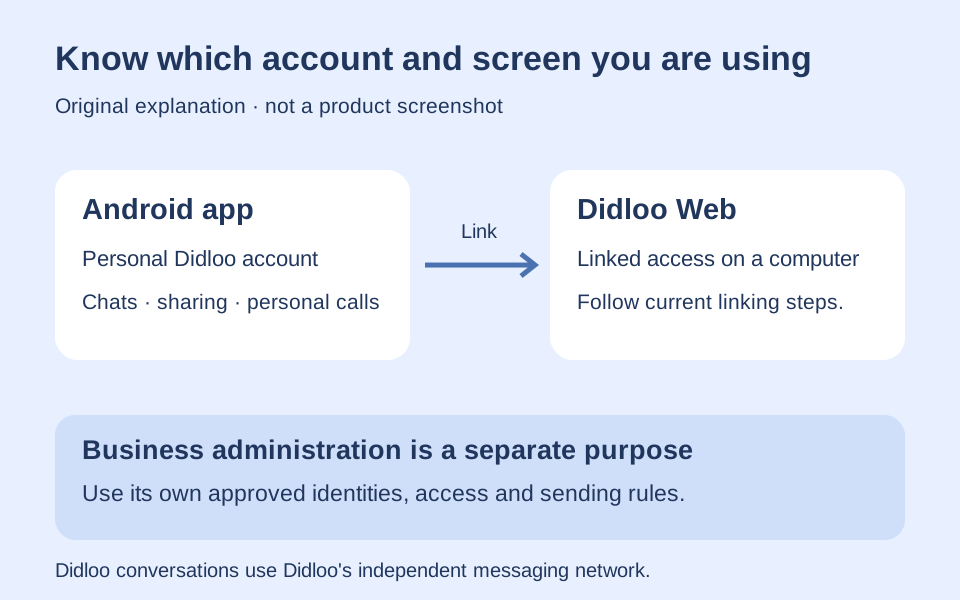
Didloo's homepage describes linking the phone account to Didloo Web for computer use. It specifically directs phone and tablet users to the app. Follow the account-linking steps shown by the current product rather than assuming that a separate business dashboard login represents the same personal conversation session.
For a relative writing a longer reunion update at a desk, computer access may be a convenient working surface. Confirm that the intended account and conversation are visible before composing. This guide does not invent a new sign-in method or claim that every browser or device class is supported. The practical distinction is between the personal account's linked desktop experience and other Didloo destinations that have different purposes, identities and permissions.
Keep the linked computer appropriate to the account
A linked computer can make a conversation easier to read and type, but the surrounding environment still matters. Consider who else uses the device and what may be visible on its screen. Use the app's actual account and device controls when reviewing access.
For the fictional family, a private home computer and a shared public machine present different circumstances. Do not assume that closing a tab proves that every account connection has ended. Check the current interface for the relevant session action instead of relying on an imagined button or an undocumented automatic timeout. This is a general account-use recommendation. It does not claim a particular device limit, session duration or remote-removal feature without confirming it in the current product.
Move between phone and computer with clear expectations
When using more than one surface, check the current conversation before acting on an older view. A desktop window that has been open for a while should not be treated as the final authority on a plan without reviewing the latest visible discussion.
A relative preparing the final travel message can first confirm which arrangement is current and then write the update on the preferred device. Keep the content decision separate from the convenience of the screen used to type it. This article does not promise offline synchronisation behaviour or a precise update time. If two devices show an unexpected difference, describe the observed state and the time of the observation rather than assuming that a successful account link guarantees every possible history or connectivity scenario.
Distinguish a visible status from a person's understanding
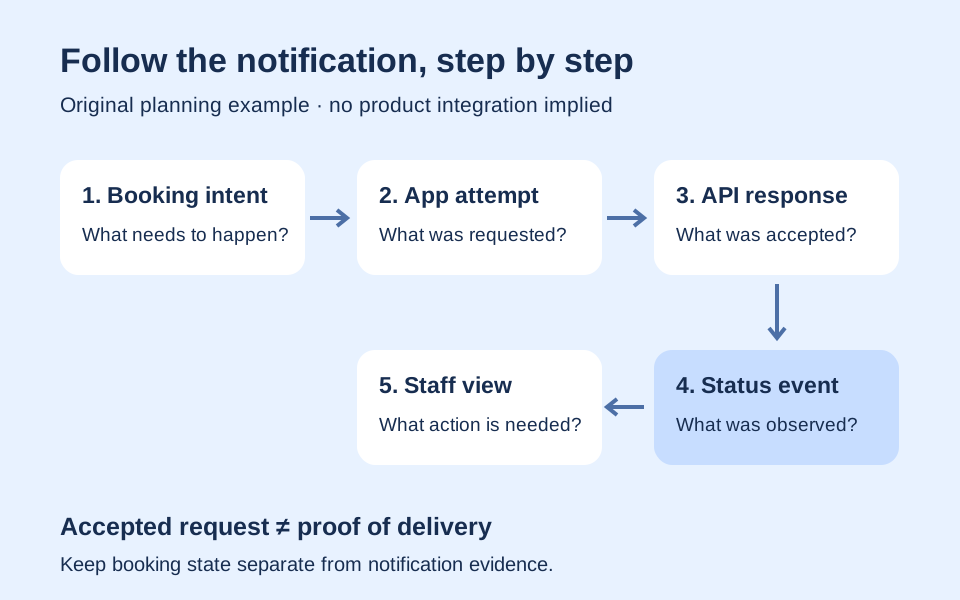
Messaging interfaces may present information about an operation or conversation, but communication still requires interpretation. Use the actual labels shown in the current app and avoid claiming more than their documented meaning. A technical observation and a person's agreement are different things.
In the reunion example, an important change should be confirmed in an understandable way by the people affected. Do not rely on an assumed universal meaning for a mark, colour or icon copied from another product. This guide deliberately does not assign unverified delivery or read semantics to a Didloo badge. The useful habit is to connect the information the interface provides with the real communication need, asking for an ordinary confirmation when the arrangement genuinely requires one.
Share drawings as conversation material
The public Didloo pages mention Drawing Board and available creative tools. A drawing can be a useful way to explain an arrangement or share an idea. Evaluate the actual controls and availability in the installed version before planning around a specific operation.
The fictional family might sketch a simple seating idea and discuss it, keeping the sketch clearly labelled as a proposal. A creative illustration does not become a confirmed venue plan merely because it is easy to share. Preserve the distinction between an idea and the facts supplied by the organiser. This is an original use example, not evidence that the particular drawing was produced in Didloo or that the app automatically understands the layout, verifies measurements or exports every format a recipient might request.
Check creative-tool availability before making a commitment
Didloo's public material qualifies creative and AI features by current availability, device and app version. Treat that qualification seriously when evaluating a project. A broad creative category does not imply that every advertised model, duration or output option is currently usable by every account.
For the reunion, a playful creative item can be considered separately from the essential travel information. Inspect the real task and any applicable requirements before authorising work. This article runs no generation, quotes no price and asserts no connection to a named external vendor. Its purpose is to help users distinguish an optional creative experiment from the core conversation they need to keep clear. A feature being available in one environment is not evidence that an older installed app has the same implementation.
Read the current privacy and terms destinations
Didloo links its Privacy Policy and Terms from the public website. Use the current documents to understand the published information about the service instead of assuming that another messaging product's policies apply. A familiar interface does not establish identical data handling or contractual conditions.
When planning the family conversation, decide what information belongs in the group and what should be discussed more narrowly. That choice remains useful regardless of a person's assumptions about technical protection. This guide makes no unverified encryption, anonymity or retention guarantee. It also does not interpret the documents as legal advice. The practical recommendation is to read the official information and keep unnecessary personal details out of examples, shared screenshots and messages whose audience is broader than intended.
Keep business administration separate from personal messaging
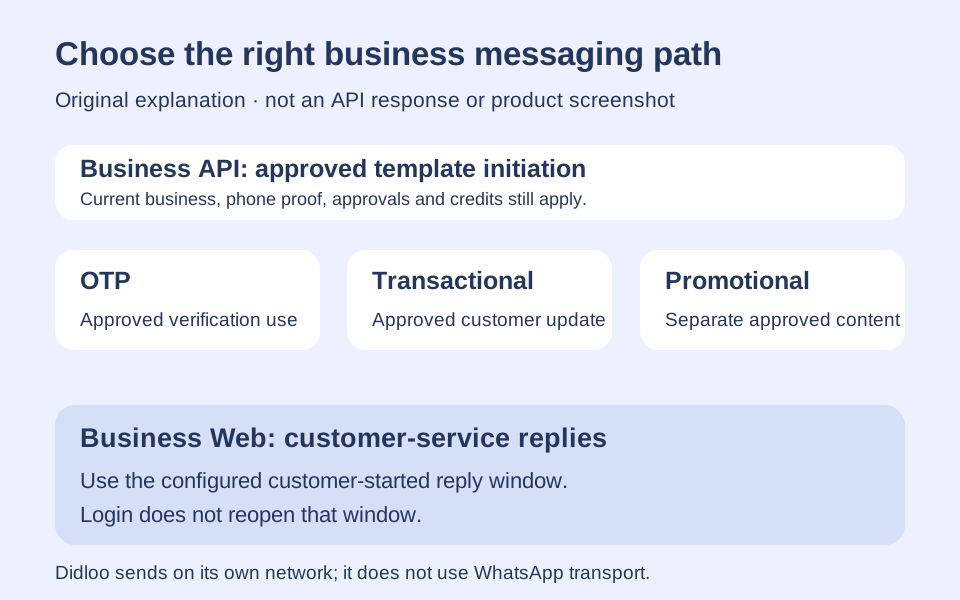
Didloo's public site distinguishes personal messaging from the Business Messaging API and the business dashboard. The business workflow has its own identities, approvals and sending rules. A personal chat, linked desktop session and business management screen should not be treated as interchangeable routes to the same authority.
For the reunion, ordinary participants need their personal conversation rather than business template administration. A person evaluating Didloo for an organisation should separately read the Business API information and determine where recipients receive those messages. This article does not suggest that a consumer profile can bypass business approval or that business permissions grant access to private personal conversations. Keeping the purposes clear helps users choose the right destination before entering credentials or interpreting a screen as proof of permission.
Do not assume that changing apps imports old conversations
Didloo's public comparison page does not advertise WhatsApp chat-history import. Treat the new conversation as a Didloo conversation unless the current official product information explicitly documents a supported migration process for the material involved. Similar messaging concepts do not establish compatible storage or transport.
The fictional family can carry forward its agreed plan by writing a fresh, accurate update that participants understand. That is different from promising a complete technical transfer of earlier history. Keep source records through the original service's appropriate methods when needed, and do not erase them merely because a new group has started. This is a planning distinction, not an instruction to perform a migration or a guarantee that old content can be reconstructed after account or device changes.
Describe problems precisely before changing the setup
If an expected action does not work, identify the surface, account type, intended recipient and observation. Was the app unable to open, was the account-linking step incomplete, or was the message aimed at somebody who has not joined the network? Those questions lead to different next steps.
For the reunion, keep one low-stakes example while clarifying the issue. Avoid repeatedly reinstalling or resending important information without understanding what happened. Record only the necessary details and keep verification codes, private messages and credentials out of public support posts. This is a general troubleshooting method, not a claim that the guide diagnoses a specific device fault. A useful description lets the appropriate support process address the actual problem instead of an ambiguous statement that everything failed.
Decide whether the actual workflow fits your needs
A useful evaluation ends with evidence from the tasks that matter to the participants: reaching the intended people, keeping plans understandable, sharing appropriate material and using the supported phone or computer surface. It should not become a promise that every feature, account type or future version has been tested.
For the fictional reunion, the best result is a conversation whose members know where to find the current arrangement and how to respond. Didloo provides an independent place for that exchange, with separate personal and business experiences described in its official pages. Users still decide what to communicate and how to confirm an important plan. A small, clear evaluation supports that decision more effectively than an unsupported ranking, an invented compatibility claim or a demonstration unrelated to the people who need the conversation.
Further reading
Official resources and related guides for the concepts discussed above. Check the selected tool for current capabilities and terms.
Take the next idea into a conversation
Explore Didloo for personal chats, creative sharing and linked desktop messaging. Business messaging has its own approved API workflow.