Information Technology
fal AI Explained: Plan Model APIs, Queues and Creative Asset Review
fal provides infrastructure and APIs for running models. Choosing a model is one part of a useful creative workflow; preparing inputs, following a request and deciding whether its result is suitable are separate responsibilities. This independent guide explores those decisions through a fictional stationery project. It does not describe a fal integration in Didloo or WeBot, report a benchmark or claim that any example image was generated. The exercises are original planning scenarios rather than instructions to spend money or create an account.
Define the asset before looking through models
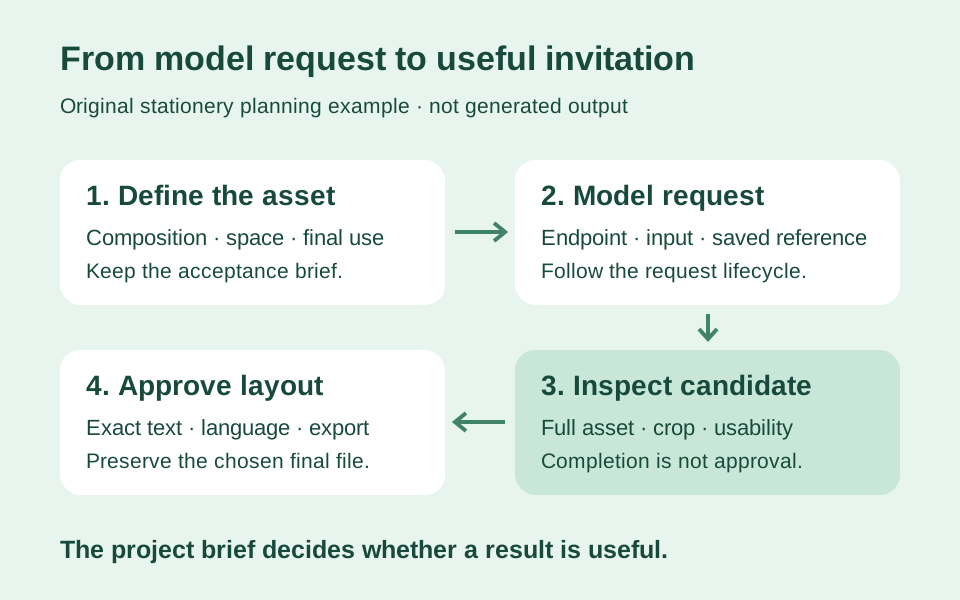
A fictional stationery studio, Paper Orchard, wants an illustrated background for a workshop invitation. The required asset has a clear purpose: leave room for event information, support the workshop's visual theme and remain legible when printed. The studio does not need an impressive picture with nowhere to place its date and venue.
Write those requirements as a short acceptance brief. Include the intended dimensions, the content that will be added separately and the audience that will see the result. This makes comparison more practical because each candidate can be judged against the same task. A striking gallery example may be interesting without fitting the invitation. Starting with the asset's purpose also helps the studio distinguish a generation problem from a layout problem before changing models or submitting additional requests.
Understand what a model endpoint represents
fal's inference documentation describes calling hosted models and deployed applications through documented endpoint identifiers. The chosen endpoint determines the relevant input and output contract. Read that model's current reference instead of assuming that every item in a shared platform accepts the same fields or produces the same media.
For Paper Orchard, make an evaluation note identifying the model endpoint and the intended task. Keep it with the design brief, not merely in a developer's terminal history. If another editor later revisits the project, the note should explain what was evaluated and which assumptions were checked. This is an application planning recommendation. A platform providing a common calling method does not mean that switching an identifier automatically preserves a project's content expectations, output structure or editorial approval.
Match the task to the model's actual inputs
Before evaluating a candidate endpoint, identify whether the project starts from text, an authorised reference image or another input type. Read which fields are required and which options are supported. Do not use a familiar parameter name from an unrelated model as proof that the selected endpoint understands it.
The stationery studio might begin with a written description of a botanical border. If it later wants to modify an existing layout, that is a different task requiring a suitable input contract. Record the change in the brief rather than disguising it as a small wording adjustment. This keeps model evaluation tied to the real task and prevents a confusing comparison between candidates produced from materially different inputs. The endpoint reference is the technical authority for its fields; the studio's brief remains the authority for what the invitation needs.
Write a prompt that describes visual relationships
An effective working prompt should make the intended composition understandable. For the fictional invitation, describe where decoration belongs and where important information will be added. Separate the subject, arrangement and useful constraints instead of building a long list of fashionable adjectives with unclear relationships.
Paper Orchard could ask for a botanical border surrounding an uncluttered central area. The team should then judge whether that central area is actually useful at the planned invitation size. A longer prompt is not automatically a better brief. When revising, identify which visible problem the change is intended to address. Keep the earlier text so that the next comparison can explain what changed, rather than becoming a search through slightly different phrases whose effects nobody recorded.
Keep exact event text in the design workflow
Decide which information must be exact before evaluating generated imagery. An invitation's date, venue and booking details need ordinary editorial checking regardless of how the decorative background was produced. Keeping those elements in a controllable layout can make revisions easier to review.
For Paper Orchard, imagine that the workshop moves from Saturday to Sunday. The final design should have a clear place where the date can be changed and checked without confusing it with decorative artwork. This is a proposed production practice, not a universal claim about text rendering in every model. If a selected workflow generates visible lettering, inspect it character by character. A plausible-looking word or attractive arrangement is not evidence that the published invitation contains the information the organiser approved.
Choose an inference method deliberately
fal documents several calling patterns, including direct requests, queue-backed calls, progressive streaming and real-time connections. Their interaction styles differ. Consult the current inference guide for the supported method and client being used. A blocking example and an asynchronous application solve different coordination problems.
For the stationery studio, first decide what the user should experience while a candidate is being prepared. A simple internal experiment may suit a different interaction from a website where people leave and return to their work. Describe the desired behaviour before selecting a client function. That decision helps the team avoid confusing a short code sample with a complete product flow. The smallest possible request is useful for learning the contract, while an application also needs to explain what happens before and after it.
Understand the asynchronous queue at a high level
fal's asynchronous guide explains submitting a request, retaining its identifier and retrieving its result later through the queue workflow. It distinguishes waiting, processing and completion states. Review the current guide for the precise response and status types in the selected SDK rather than inventing a universal response structure.
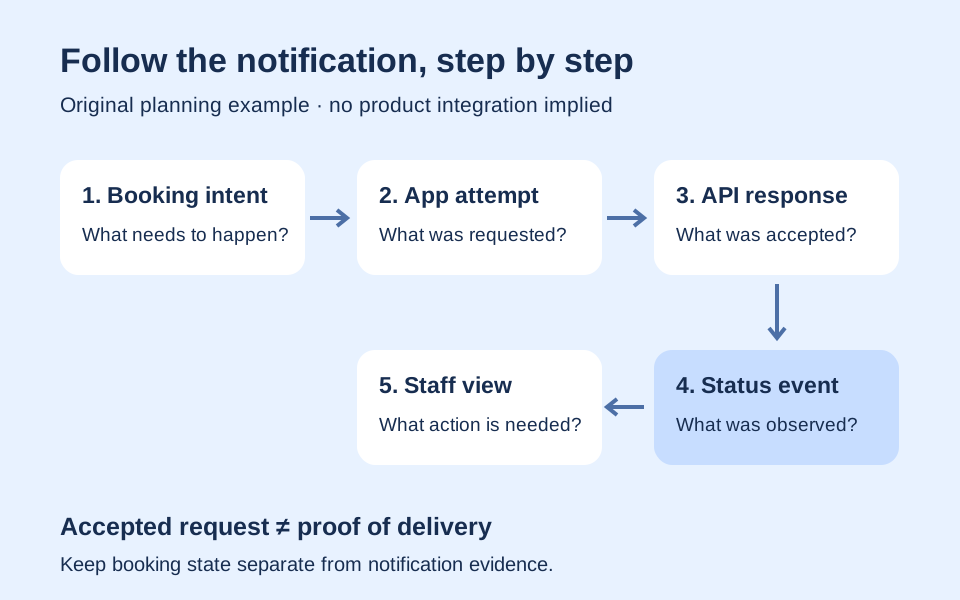
In Paper Orchard, a submitted illustration request should be connected to the design project that created it. A designer returning later should be able to locate that request without submitting another simply because the original browser tab was closed. This is a recommendation for the studio's application records. The provider's request lifecycle and the invitation's editorial lifecycle are related, but not identical: a completed computation still needs the team to inspect whether the resulting asset fits the brief.
Preserve the request reference with the project
The queue documentation recommends keeping the request identifier for later status or result retrieval. Use the documented response information for the relevant operation instead of guessing a URL from the visible name of an endpoint. Record enough context to reconnect a request with its intended purpose.
A proposed Paper Orchard project record could contain the brief version, model reference, input version and provider request reference. Keep the eventual chosen asset separate from unsuccessful or rejected candidates. This makes the project easier to resume and helps explain why a particular illustration was selected. It also prevents an accidental association between a newly returned result and an unrelated invitation currently open on the designer's screen. These suggested project fields describe an application design, not compulsory database columns supplied by fal.
Show progress without inventing precision
A progress interface should communicate the observations the application actually has. A known waiting state can be described as waiting; it should not become an exact time-to-completion promise without evidence. The same principle applies to a percentage display whose value is unrelated to the actual operation.
For the stationery studio, an informative status could show that the request remains in progress and that the project is saved. The wording should help the designer decide whether to continue working elsewhere or investigate a genuine failure. Keep technical detail available to the team that needs it, while the ordinary interface explains the next useful action. This is a user-experience recommendation rather than a claim about a guaranteed provider response time or measured queue behaviour for the fictional example.
Treat webhooks as a way to learn about completion
fal's webhook guide describes receiving a result notification at an endpoint supplied with an asynchronous request. This is an alternative to repeatedly checking for completion. Read its current payload and validation guidance when designing the receiver, including how success and failure are represented.
Paper Orchard's application could receive an event even when the designer's screen is not open. The receiving component should match the event to the saved request and update the appropriate project record. Do not let an incoming notification choose an arbitrary project simply because a supplied field resembles an internal identifier. This is a proposed authorisation boundary for the application. A callback is information to validate and interpret; it is not an unrestricted instruction to publish whatever resource is mentioned in its body.
Make a repeated event safe to handle
A general defensive design practice is to make event processing harmless when the same observation is encountered again. Recording a request's completion twice should not create two published invitations or start another generation automatically. This advice does not assert a particular undocumented callback retry schedule.
An isolated exercise for Paper Orchard is to process one authorised test event twice and compare the resulting project records. The event history may note the repeated receipt while the chosen asset remains unchanged. Decide what counts as a new business action and what merely updates an observation. This makes an integration easier to reason about and reduces the temptation to fix duplicates by deleting unexplained records. Keep the exercise outside real publication and spending workflows so that its outcome is easy to inspect.
Keep generation and publication as separate decisions
A model finishing its work means that a result is available for evaluation. It does not mean that the studio has approved its invitation. Maintain a clear editorial step between receiving the asset and making it visible to the intended audience.
Paper Orchard might reject a candidate because its decorative border obscures the area reserved for the venue. Another candidate could fit the layout but contain an unwanted visual element that needs revision. Those are review outcomes, not necessarily request failures. Record why the asset was accepted or rejected. This produces useful project knowledge and prevents operational dashboards from counting every successful generation as a successful design. The team remains responsible for the final arrangement and for the accuracy of the invitation's separately edited information.
Use a small comparison set with a clear question
When evaluating models or settings, choose a manageable set of candidates and state what the comparison is intended to reveal. A collection of unrelated attractive results does not answer whether a particular endpoint meets the stationery project's requirements.
Paper Orchard could compare whether two configurations preserve enough uncluttered space for the same approved invitation layout. Keep the input brief and the evaluation criteria visible. If several important variables change together, record that limitation rather than attributing the whole difference to one setting. The point is to make the next decision better informed, not to manufacture a winner from a tiny sample. This guide reports no measured quality ranking, speed comparison or claim that any model reliably produces a particular aesthetic.
Inspect the full asset and the final crop
Reviewing a small preview can hide defects that matter in the final use. Inspect the complete candidate, then place it in the actual invitation layout and check the crop. The relationship between image and text may change at different display sizes.
In Paper Orchard's fictional layout, a border that looks balanced in the source image may crowd the workshop title after cropping. Check corners, edges and any focal element that competes with the event information. Keep a record of the crop used for approval so that a later export does not silently change the composition. These are original editorial review suggestions. They do not imply that an automated quality check was performed or that a generated asset has been certified as suitable for print.
Preserve English and Hindi meanings in the layout
A bilingual invitation needs more than replacing one heading with its translation. Review the date, venue, instructions and the amount of space each language needs. A clear English layout may require adjustment for a complete Hindi explanation, and that adjustment should preserve the same intended action.
Paper Orchard can use the same fictional event brief to review both versions independently. Compare meaning rather than insisting on identical line breaks. The decorative background should leave enough usable area for either approved text. This is a proposed review exercise, not a claim of native-speaker approval. The generated background and the translated event copy are separate production elements; evaluating one does not establish the correctness of the other. Keep the chosen language and text version attached to the final exported invitation.
Plan file retention before depending on an output URL
fal's retention documentation separates stored request information from uploaded and generated media, with controls that must be understood for the actual workload. Consult the current policy and configuration rather than assuming that a returned URL is a permanent archive. The documentation also distinguishes retention controls from broader zero-retention arrangements.
For the stationery studio, decide which approved assets need to be preserved and who owns that responsibility. An external URL in a project note is not a complete preservation plan. Keep an authorised final copy according to the studio's storage and recovery process. Record enough provenance to understand its origin without unnecessarily duplicating private inputs. These are application planning recommendations; this article does not promise a particular expiry period or claim that a special retention arrangement is enabled by default.
Review access separately from retention
A file's availability period and who can access it are different questions. fal's FAQ explains default media-link accessibility and points to file access controls. Read the applicable current documentation for the selected workflow before putting private source material behind an assumption that a difficult-to-guess URL is private.
Paper Orchard's fictional event background may be intended for publication, but an uploaded client reference can have a different audience. Classify inputs and outputs separately. A project can require a shareable final illustration while limiting access to internal drafts. This distinction should guide storage and access decisions instead of treating everything associated with one generation as equally public. Do not place secrets or confidential customer details in example prompts merely because the final invitation itself will eventually be public.
Protect the API key with a defined permission scope
fal's key-based authentication documentation describes secret keys and permission choices, including model restrictions. Review the current options when a real project is authorised to configure access. The secret belongs in an appropriately protected environment, not in a public example or a visitor-facing bundle.
For a prospective Paper Orchard application, trace which component needs to create requests and which component only displays approved results. Those tasks do not automatically need identical authority. Keep documentation examples free of real keys and describe the responsible role for changing credentials. This is an architectural exercise; no account is created and no key is generated by this guide. The goal is to give the team a clear boundary between creative interaction, server-side authority and ordinary access to a finished invitation.
Estimate expenditure from the actual model and scenario
An estimate needs the chosen endpoint, its current billing basis and the production assumptions. Check the official model and pricing information when preparing a real budget. Do not apply a remembered rate for one model to every service available through the platform.
Paper Orchard might separately estimate initial candidates, reviewed revisions and final exports. Label the quantities as assumptions and include the effort spent reviewing results. If a design brief changes, update the estimate rather than pretending the new task was covered by an earlier total. This article contains no live price, free-credit allowance or measured cost per accepted invitation. Its planning approach helps distinguish technical usage from the broader cost of producing something that meets the organiser's requirements and can be maintained by the studio.
Distinguish concurrency from the total project size
fal's FAQ explains that accounts have concurrency limits and that excess requests can wait in the queue. Consult the current account and product documentation for the applicable limits. A large project total alone does not establish how many requests should run at once.
A fictional studio could have many invitations to prepare but only a few editors available to review them. Sending everything immediately might create a large set of candidates before anyone notices that the brief needs changing. Plan the work in reviewable batches and observe where the actual bottleneck lies. This is a production-management recommendation rather than a promised provider capacity figure. Keep account limits, application scheduling and human review capacity visible as separate constraints when deciding how quickly to expand an evaluation.
Investigate failures before deciding to submit again
When an operation fails or appears stalled, identify what the application actually observed. Did it create a request, retain the reference, obtain a status and retrieve a result? Was the returned asset unsuitable, or did the operation itself fail? These are different situations requiring different responses.
For Paper Orchard, submitting again without checking the saved request can turn one unclear observation into several unrelated candidates. Start from the recorded project intention and inspect the relevant stage. Follow the endpoint's current error and retry guidance for a real implementation. Keep the distinction between technical recovery and a designer requesting a new candidate. The latter should be an explicit project decision, not an accidental effect of a screen refresh or an ambiguous error message.
Record the configuration without claiming perfect reproducibility
Keep the input, relevant model reference, chosen settings and evaluation date with the candidate record. These details support investigation and later comparison. They should not become a promise that a future request will necessarily return an identical asset under all conditions.
Paper Orchard can preserve the actual approved file as well as the notes explaining how it was obtained. If a later project reuses the approach, treat its new result as another candidate requiring review. This is more reliable than assuming that copying an old prompt also copies the old approval. Record optional controls only when the selected endpoint documents them; a familiar setting name from a different workflow is not evidence of support. The practical goal is traceability and informed reuse rather than an unsupported determinism claim.
Explain the workflow honestly to collaborators
A collaborator should know which parts are generated, which are separately designed and which facts require editorial approval. Avoid describing a candidate as a proven product capability or a measured example when it is only a proposed workflow. Clear labels help the next person make a sensible decision.
For the fictional stationery project, the studio could identify the approved background, the separately edited event text and the person responsible for the final export. It should not imply that fal endorsed the event or certified the invitation's contents. Likewise, this independent article does not connect fal to Didloo or WeBot as an integrated feature. The provider supplies model infrastructure; the project team defines the purpose, checks the content and decides what is ready to share.
Finish with evidence of a useful asset
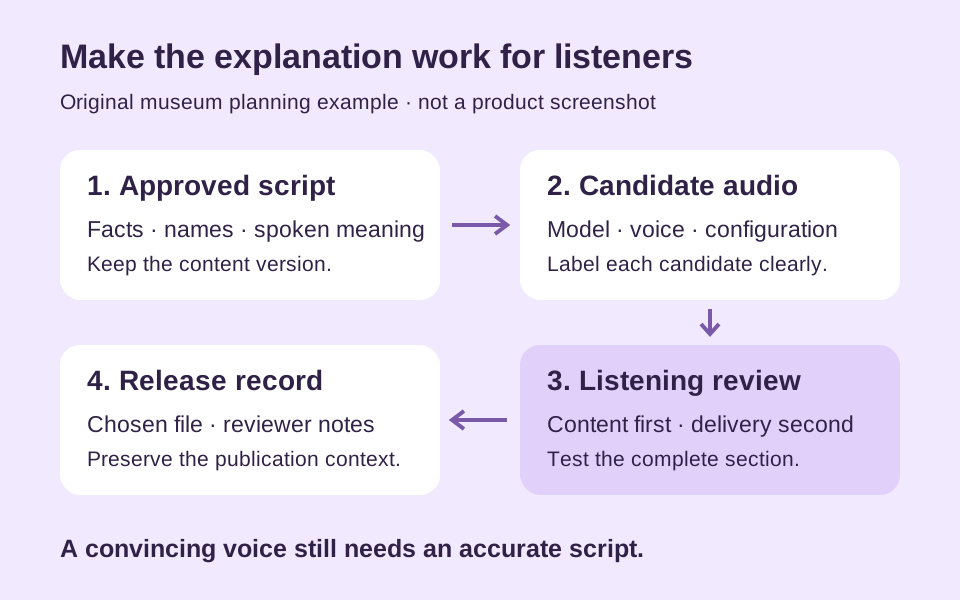
A release record should gather the approved brief, selected file, relevant configuration notes, final layout and review outcome. Check the actual exported invitation rather than relying on a remembered preview. Note which language versions and intended uses were reviewed.
Paper Orchard's completion criterion is a usable invitation whose details are correct and whose visual arrangement supports them. An API call is one operation within that process. Understanding fal's model contracts, request lifecycle and storage choices helps the team build the technical part, while disciplined editorial decisions make the result useful. Keeping those responsibilities connected allows a future revision to begin with clear evidence instead of another round of unrecorded experiments or an unsupported assumption that every generated candidate is already publication-ready.
Further reading
Official resources and related guides for the concepts discussed above. Check the selected tool for current capabilities and terms.
Take the next idea into a conversation
Explore Didloo for personal chats, creative sharing and linked desktop messaging. Business messaging has its own approved API workflow.